
NMEA 2000 networks: backbone, drops and terminators
One cable, many voices: an NMEA 2000 network lets instruments, displays and sensors share their data. How it is laid out, where its limits lie and why most faults are simple ones.
Behind the instrument panel of a modern yacht there is often a single slim cable running from one end of the boat to the other, with short branches leading off to displays, sensors and the autopilot. It replaces the bundles of thin wires that once ran from each instrument to each display, and it quietly carries depth, wind, heading, position and engine data to every device that wants to listen. When it works, nobody thinks about it. When it fails, every screen on board seems to go wrong at once.
What NMEA 2000 is
NMEA 2000 is a data network for marine electronics based on the CAN bus, a robust system first developed for vehicles. It runs at 250 kbit/s, which is ample for instrument data such as depth, speed, wind, heading, position and engine values. Every device on the network can send and receive, so a single wind sensor can feed several displays and the autopilot at the same time, and a new display can show data from sensors that were installed years earlier.
Large amounts of data are a different matter. Radar images, sonar and cameras need far more bandwidth and usually travel over Ethernet between the units that use them, while NMEA 2000 carries the instrument data alongside. Older NMEA 0183 devices, which talk over simple serial connections from one sender to a few listeners, can be integrated through gateways that translate their sentences into network messages.
Backbone, drops and terminators
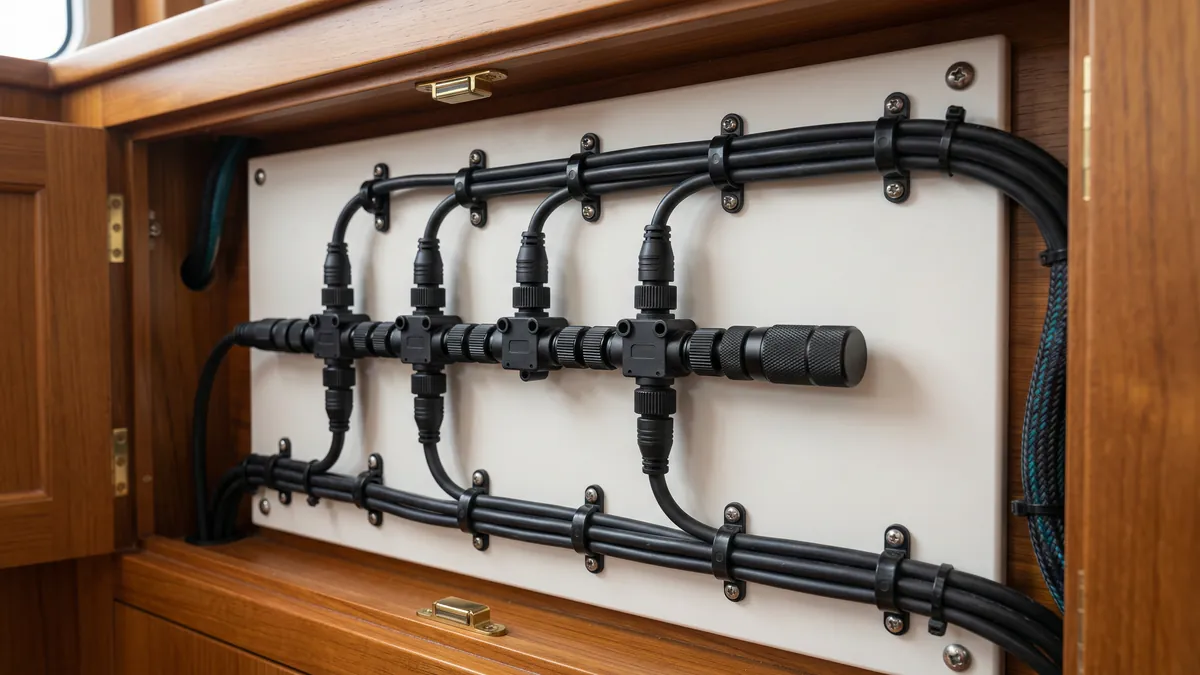
The layout is simple and strict. A backbone, sometimes called the trunk, runs through the boat. At each end of the backbone sits a terminating resistor, and there must be exactly two of them, never more and never fewer. Devices connect to the backbone through T-pieces and drop cables, and each drop can be up to 6 metres long. A device must never take the place of a terminator at the end of the backbone, and drops should not be daisy-chained from one device to the next.
Power is fed into the backbone through a dedicated cable, protected by a fuse, from the 12 V supply of the yacht. On longer networks, feeding the power in near the middle of the backbone spreads the voltage drop evenly towards both ends. Some devices take their power from the network; others have their own supply and use the network only for data.
| Item | Guide value |
|---|---|
| Data rate | 250 kbit/s |
| Terminating resistors | One at each end of the backbone, two in total |
| Drop cable length | Up to 6 metres per drop |
| Physical devices | Up to 50 on one network |
| Backbone length | Depends on the cable type; up to 200 metres with heavy cable |
| Power budget | Counted in LEN; one LEN equals 50 mA |
Values as commonly given for NMEA 2000 networks. The specifications of your cables and devices take precedence.
The power budget in LEN
Each device states its current draw from the network as a load equivalency number, or LEN, where one LEN is 50 mA. Adding up the LEN values of all the devices powered from the network gives the total current the backbone must carry, and with it the voltage drop along the cable. A network that works perfectly with five devices can begin to misbehave when a few more are added at the far end, because the voltage there sinks too low for reliable data.
Backbone cable comes in different weights. Lighter cable is easier to route through a small yacht and suits short backbones; heavy cable carries more current with less voltage drop and allows the longest runs, up to 200 metres. Write the LEN of each device on the network plan as you add it. On a larger yacht with a long backbone, heavier cable, a central power feed or a network divided into sections may be needed to keep the voltage healthy at every device.
Most network faults are not mysterious: a missing terminator, a wet connector or a long backbone starved of voltage.
Benefits worth planning for
The great advantage of NMEA 2000 is shared data. One set of sensors serves every display, so the helm and the chart table see the same numbers, and a replacement display joins the network without new cable runs to each instrument. Fewer cables mean fewer holes in bulkheads and a tidier installation. Devices from different makers that follow the standard can usually talk to one another, although some functions, such as the remote control of an autopilot or software updates, may only work within the range of one maker.
Typical faults and how to find them
- Missing or extra terminators: data errors, devices appearing and disappearing.
- Poor connectors: corrosion or water in a connector on deck or near the bilge, loose threaded couplings.
- Voltage drop: devices at the far end of a long backbone reset or lose data.
- Overlong drops, or a device used as a backbone end: unstable communication.
- A second power feed added without a plan: conflicts and faults that are hard to trace.
Several of these can be checked with the network switched off. With the power disconnected, a multimeter across the two data lines of the backbone should read about 60 ohms, the value of two 120 ohm terminators in parallel; about 120 ohms means one terminator is missing, and about 40 ohms suggests a third. With the network powered, the voltage at the device furthest from the power feed shows whether the backbone is starved. Beyond that, a network diagnostic tool or a qualified installer can read error counts and find the device that causes the trouble.
Plan, label and document
A network grows over the years as devices are added, and without a plan it becomes a puzzle for the next person who works on it. Draw the backbone with its T-pieces, drops, terminators and power feed, note every device with its LEN and location, and label each drop cable at both ends. Leave a spare T-piece or two in accessible places for future devices. Keep connectors out of the bilge and away from spray where you can, and use sealed versions where you cannot.
Questions and answers
Can I connect my old NMEA 0183 instruments to NMEA 2000?
Yes, through a gateway that translates between the two. Check that the gateway handles the specific data you need, because not every sentence or message is translated.
How many devices can I add to my network?
The standard allows up to 50 physical devices, but the power budget and the length of the backbone often set the practical limit first. Add up the LEN of all powered devices and check the voltage at the far end.
Does a drop cable count towards the backbone length?
No, drops are counted separately, but each should be no longer than 6 metres and the total length of all drops is limited as well. The installation instructions of your devices and cables give the figures.
Why do my instruments go blank when the engine starts?
The dip in voltage while the engine cranks can reset devices on the network. Feeding the network from the house bank rather than the starter battery, through a fused supply, usually helps; an electrician can check the supply and the voltage on the backbone.
Our articles are general information written with care. Intervals and figures are guide values; the maker’s manual, your flag state, classification society and insurer take precedence, and safety critical work belongs with qualified professionals.